

OneView automatically manages your Identity Graph as the data foundation of your workspace. No action required.
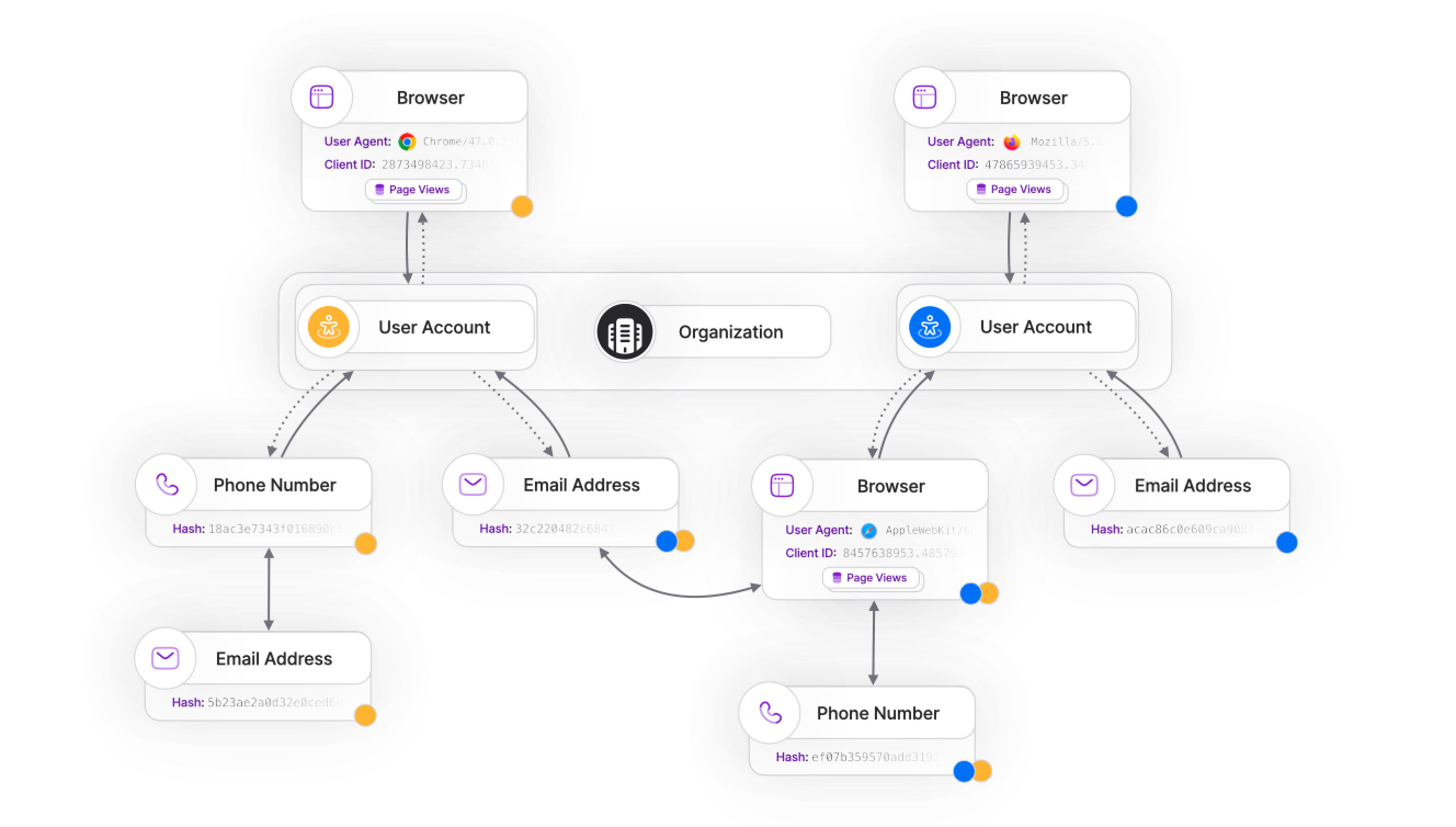
OneView automatically manages your Identity Graph as the data foundation of your workspace. No action required.
What is Identity Resolution?
Identity Resolution connects customer identifiers across devices, sessions, and accounts to build a complete view of each user’s journey. OneView uses this to enrich Enhanced Conversions with the most complete set of identifiers available, increasing match rates with advertising platforms.Understanding identifiers:Identifiers fall into two categories:
- Anonymous identifiers: Browser cookies, device IDs, session IDs — temporary and device-specific
- Authenticated identifiers: Email addresses, phone numbers, user IDs — persistent and account-based
How Identity Resolution works
OneView builds an Identity Graph that connects all identifiers without requiring a centralized master ID. This allows you to incrementally build profiles as users interact with your site, without needing to know in advance which identifiers belong together.Connection events
Identities link automatically when users perform connecting actions:As long as you send identifiers together at some point in the customer journey, your Identity Graph will link them automatically, even if events occur out of order, as long as they happen before the conversion time.
Enhanced Conversions enrichment
OneView uses your Identity Graph to automatically enrich Enhanced Conversions with the most complete set of identifiers available:Enhanced Conversions are automatically enriched with identifiers from your Identity Graph. This increases match rates with advertising platforms, especially when click identifiers are missing or expired.
Retroactive enrichment
To maintain historical consistency, after a conversion is processed, newly found identifiers are not retroactively computed to change the attribution of that conversion.You may choose to re-attribute a specific conversion if you need to re-evaluate its attribution based on information available after its
conversion_time. Please note that re-attributing a conversion breaks historical consistency, so proceed with caution.You should instead model your funnel using different conversion events, one for each key step of the funnel.Common questions
How do I link identifiers together?
How do I link identifiers together?
As long as you send identifiers together at some point in the customer journey, your Identity Graph will link them automatically, even if the events occur out of order, as long as they happen before the conversion time — for example:
client_idandemailphoneanduser_iduser_idandemail
What identifiers are required for Enhanced Conversions?
What identifiers are required for Enhanced Conversions?
It depends on the Media Partner. Most platforms accept:
- Email (hashed)
- Phone number (hashed)
- User ID (if provided)
How does Identity Resolution help with Apple ITP compliance?
How does Identity Resolution help with Apple ITP compliance?
When click identifiers (like
gclid, fbclid) are blocked or expire due to Intelligent Tracking Prevention, OneView uses Enhanced Conversions with identifiers from your Identity Graph to maintain attribution accuracy.This allows advertising platforms to match conversions on their end using the hashed identifiers you provide, even when click IDs are unavailable.Next steps
Enhanced Conversions
Learn how OneView automatically includes PII in conversions for higher match rates.
Conversions
Understand how conversions are processed and attributed across platforms.